LM Studio 0.3.10:🔮 推测解码
Llama 8B 作为主模型,Llama 1B 作为草稿模型,均在 M3 MacBook Pro 上使用 MLX 4 位
我们很高兴地宣布 LM Studio 的 llama.cpp 和 MLX 引擎现已支持**推测解码**!
推测解码是一种在某些情况下可将令牌生成速度提高 1.5 倍至 3 倍的技术。
通过应用内更新将 LM Studio 升级到 0.3.10 版本,或从 https://lm-studio.cn/download 下载。
推测解码
推测解码是一种推理优化技术,由 Leviathan 等人的 Fast Inference from Transformers via Speculative Decoding 和 Chen 等人的 Accelerating Large Language Model Decoding with Speculative Sampling 等研究率先提出。它可以被视为一种类似于现代 CPU 中常见的推测执行优化,但应用于大型语言模型 (LLM) 的推理过程。
在 LM Studio 的 llama.cpp 和 MLX 引擎中,推测解码是通过结合使用 2 个模型来实现的:一个较大的 LLM(“主模型”)和一个较小/更快的“草稿模型”(或“推测器”)。原始的 llama.cpp 实现由 Georgi Gerganov 编写,而 MLX 的实现则由 Benjamin Anderson 和 Awni Hannun 完成。这些实现正在由开源社区持续改进。
工作原理
草稿模型会首先运行,快速预测接下来的几个令牌作为“草稿”生成。随后,草稿生成的令牌会被主模型确认或拒绝。只有主模型本会生成的令牌才会被接受。这可以在不降低质量的情况下带来潜在的加速(当足够多的令牌被接受时)。在令牌被拒绝次数多于接受次数的情况下,您可能会看到总生成速度下降!模型的选择对于实现最佳结果至关重要。
性能统计
LM Studio + MLX 引擎 (Apple M3 Pro, 36GB RAM)
| 提示 | 主模型 | 草稿模型 | 无推测 | 有推测 | 每秒令牌加速 |
|---|---|---|---|---|---|
| "用 Python 编写一个快速排序算法。只写代码。" | Qwen2.5-32B-Instruct-MLX-4bit | Qwen2.5-0.5B-Instruct-4bit | 7.30 令牌/秒 | 17.74 令牌/秒 | 2.43 倍 |
| "解释勾股定理" | Meta-Llama-3.1-8B-Instruct-4bit | Llama-3.2-1B-Instruct-4bit | 29.65 令牌/秒 | 50.91 令牌/秒 | 1.71 倍 |
| "规划一次华盛顿特区一日游" | Meta-Llama-3.1-8B-Instruct-4bit | Llama-3.2-1B-Instruct-4bit | 29.94 令牌/秒 | 51.14 令牌/秒 | 1.71 倍 |
LM Studio + CUDA llama.cpp 引擎 (NVIDIA RTX 3090 Ti 24GB VRAM, Intel Core Ultra 7 265K CPU, 32GB RAM)
| 提示 | 主模型 | 草稿模型 | 无推测 | 有推测 | 每秒令牌加速 |
|---|---|---|---|---|---|
| "用 Python 编写一个快速排序算法。只写代码。" | Qwen2.5-32B-Instruct-GGUF (Q4_K_M) | Qwen2.5-0.5B-Instruct-GGUF (Q4_K_M) | 21.84 令牌/秒 | 45.15 令牌/秒 | 2.07 倍 |
| "解释勾股定理" | Meta-Llama-3.1-8B-Instruct-GGUF (Q8_0) | Llama-3.2-1B-Instruct-GGUF (Q4_0) | 50.11 令牌/秒 | 68.40 令牌/秒 | 1.36 倍 |
| "规划一次华盛顿特区一日游" | Meta-Llama-3.1-8B-Instruct-GGUF (Q8_0) | Llama-3.2-1B-Instruct-GGUF (Q4_0) | 46.90 令牌/秒 | 49.09 令牌/秒 | 1.05 倍 |
在聊天中使用推测解码
在 LM Studio 0.3.10 中,您将找到一个新的推测解码侧边栏部分。加载主模型后(cmd/ctrl + L),您将在新的草稿模型选择器中看到兼容的草稿模型选项。
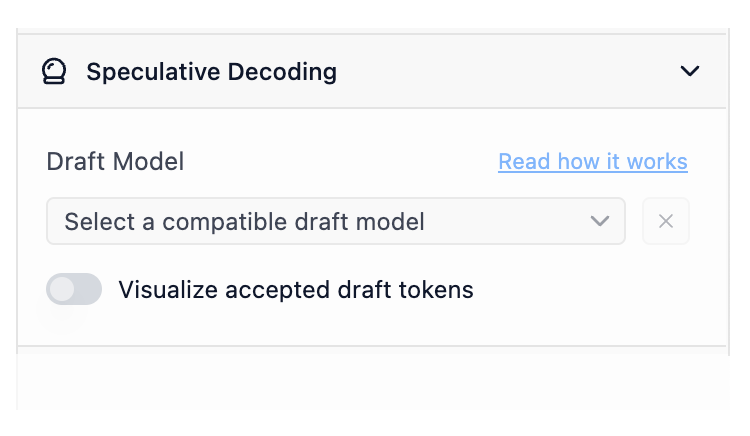
配置侧边栏中新的草稿模型选择器
草稿模型兼容性
一个模型要作为另一个模型的草稿模型使用,它们需要“兼容”。从宏观角度来看,草稿模型若要有效,它必须能够生成与较大模型相同的可能令牌。实际操作中,两个模型应共享足够相似的词汇表(模型“知晓”的令牌总数)和分词器特性。LM Studio 会自动检查您的模型是否相互兼容,以用于推测解码。
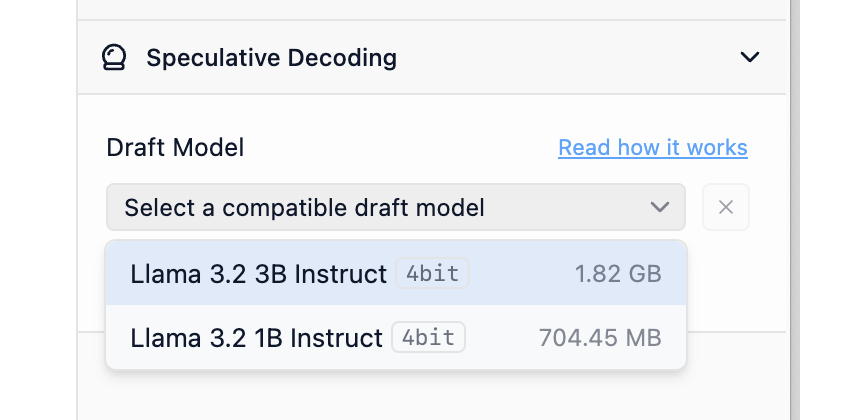
LM Studio 将自动索引可能的主模型和草稿模型对的兼容性。
可视化接受的草稿令牌
开启接受草稿令牌可视化功能,查看彩色令牌,它们指示令牌是来自草稿模型还是主模型。绿色越多,效果越好。
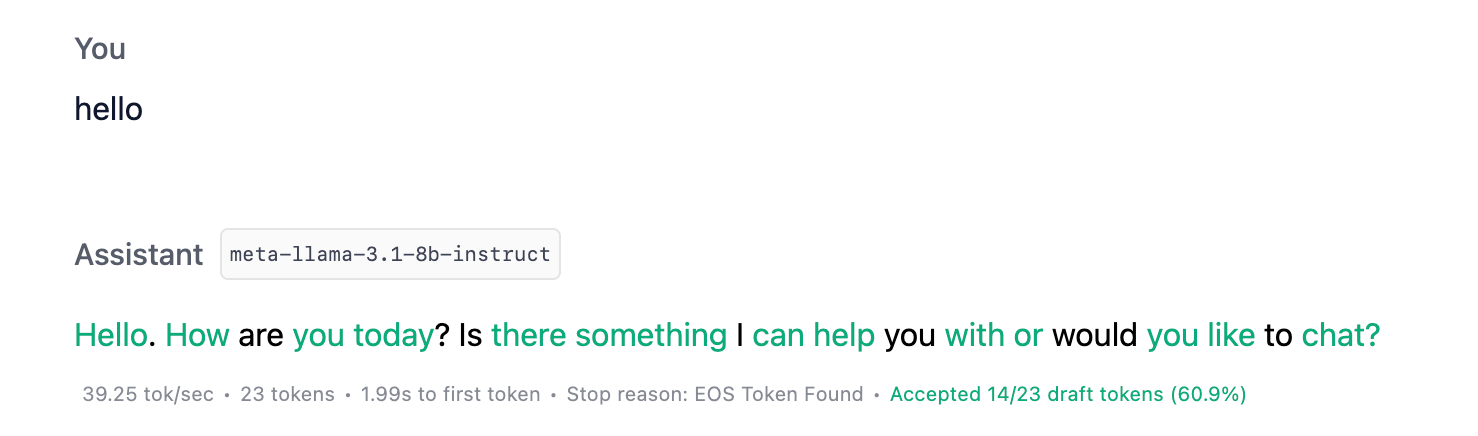
开启草稿令牌接受可视化功能,以更好地了解草稿模型性能
通过 API 使用推测解码
您还可以通过 LM Studio 的本地服务器使用推测解码。启用后,您将获得丰富的生成统计数据,包括与推测解码相关的新字段。
  "stats": {
    "tokens_per_second": 15.928616628606926,
    "time_to_first_token": 0.301,
    "generation_time": 1.382,
    "stop_reason": "stop",
    "draft_model": "lmstudio-community/llama-3.2-1b-instruct",
    "total_draft_tokens_count": 12,
    "accepted_draft_tokens_count": 10,
    "rejected_draft_tokens_count": 0,
    "ignored_draft_tokens_count": 2
  }
从 LM Studio 的 REST API 返回的统计数据。在此了解更多。
选项 1:在服务器 UI 中设置草稿模型
与聊天类似,您可以在配置侧边栏中设置草稿模型。设置后,针对此模型的请求将利用您选择的草稿模型进行推测解码。
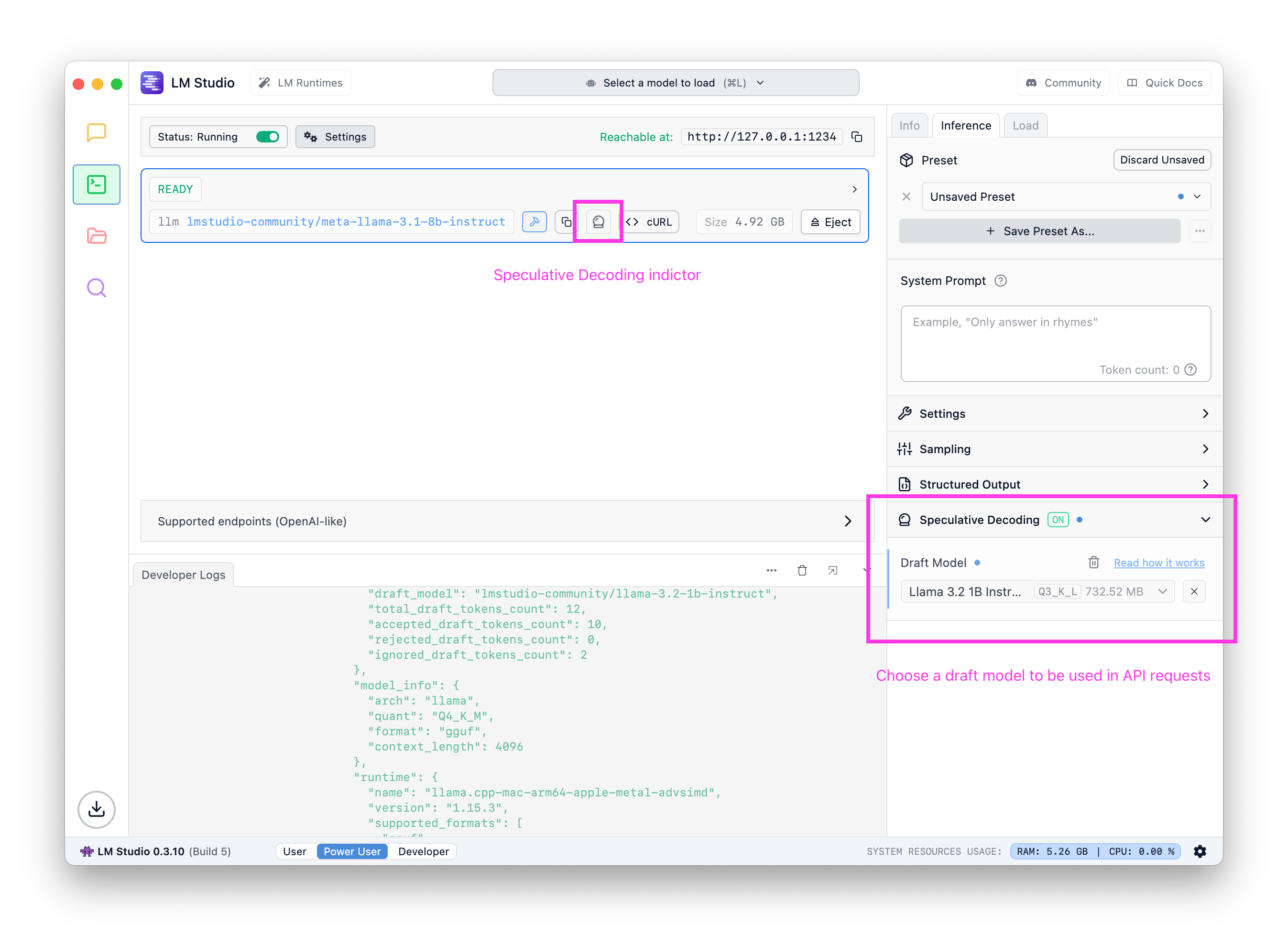
在服务器 UI 中为任何给定主模型设置默认草稿模型
选项 2:请求中的 draft_model
您还可以将草稿模型键作为请求负载的一部分提供。了解更多关于 JIT 加载的信息。
curl http://localhost:1234/api/v0/chat/completions \
  -H "Content-Type: application/json" \
  -d '{
    "model": "deepseek-r1-distill-qwen-7b",
+   "draft_model": "deepseek-r1-distill-qwen-0.5b",
    "messages": [ ... ]
}'
您可以通过 LM Studio 的 OpenAI 兼容 API 和 REST API 使用推测解码。
如何有效使用推测解码
阅读文档文章:推测解码。
通常来说,目标是将大型模型与较小型模型配对。草稿模型应比主模型小得多,并且来自同一系列。例如,您可以使用 Llama 3.2 1B 作为 Llama 3.1 8B 的草稿模型。
注意:截至 LM Studio 0.3.10 版本,如果存在 GPU,系统将尝试将草稿模型完全卸载到 GPU 上。主模型的 GPU 设置可照常配置。

许多此类情况。对于某些任务和某些模型,您可以获得超过 2 倍的加速,且不降低质量。
何时会遇到性能下降
导致性能下降的两个主要因素是:草稿模型相对于可用资源过大,以及草稿接受率低。为避免前者,请始终使用比主模型小得多的草稿模型。后者则取决于模型和提示。了解推测解码可能存在的权衡的最佳方法是在您关心的任务上亲自尝试。
查找兼容的草稿模型
由于并非所有模型都相互兼容,因此识别可以作为草稿模型和主模型协同工作的模型非常重要。
一种简单的方法是使用同一模型家族中大型和小型变体,如下表所示
| 主模型示例 | 草稿模型示例 |
|---|---|
| Llama 3.1 8B Instruct | Llama 3.2 1B Instruct |
| Qwen 2.5 14B Instruct | Qwen 2.5 0.5B Instruct |
| DeepSeek R1 Distill Qwen 32B | DeepSeek R1 Distill Qwen 1.5B |
专业提示:在 📂 我的模型中配置默认草稿模型
如果您知道您总是想使用某个草稿模型,可以在“我的模型”中将其配置为每个模型的默认设置。完成此操作后,当使用此模型时(无论是通过聊天还是 API),系统都将使用您选择的草稿模型启用推测解码。
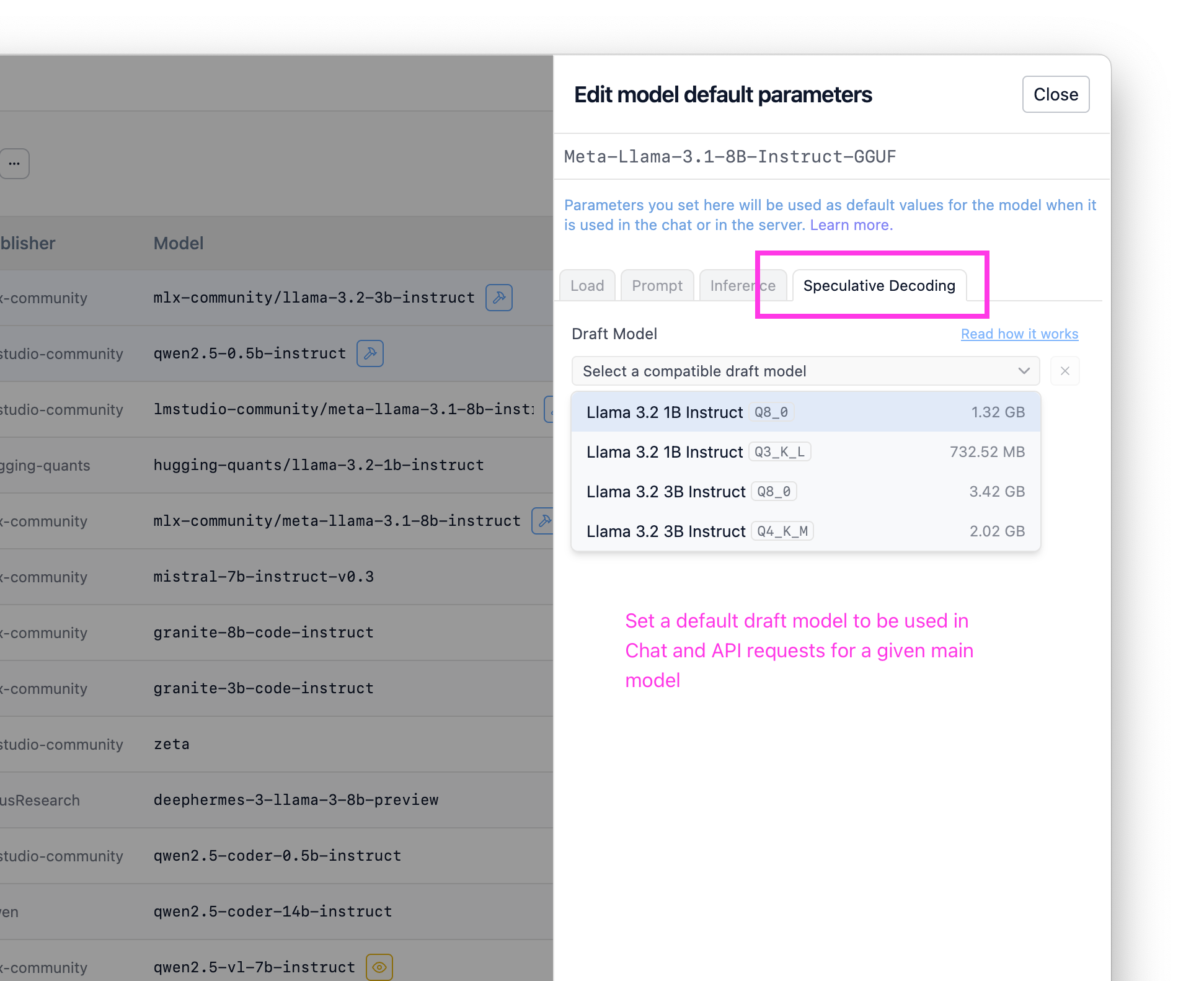
在“我的模型”中为任何给定主模型设置默认草稿模型
高级资源
我们为您整理了一些额外的资源,供您深入了解!
对此类工作感兴趣?我们正在招聘。请将您的简历和一份您引以为傲的项目说明发送至 [email protected]。
论文:
兼容性检查实现
以下是 llama.cpp 和 MLX 中用于检查模型之间推测解码兼容性的当前实现的摘录。
# The current MLX compat check is very minimal and might evolve in the future
def is_draft_model_compatible(self, path: str | Path) → bool:
    path = Path(path)
    draft_tokenizer = mlx_lm.tokenizer_utils.load_tokenizer(path)
    if draft_tokenizer.vocab_size != self.tokenizer.vocab_size:
        return False
    return True
来源:
llama.cpp: ggml-org/llama.cppMLX: lmstudio-ai/mlx-engine
0.3.10 - 完整更新日志
**Build 6**

- Fixed an issue where first message of tool streaming response did not include "assistant" role
- Improved error message when trying to use a draft model with a different engine.
- Fixed a bug where speculative decoding visualization does not work when continuing a message.

**Build 5**

- Bug fix: conversations would sometimes be named 'Untitled' regardless of auto naming settings
- Update MLX to enable Speculative Decoding on M1/M2 Macs (in addition to M3/M4)
- Fixed an issue on Linux and macOS where child processes may not be cleaned up after app exit
- [Mac][MLX] Fixed a bug where selecting a draft model during prediction would cause the model to crash

**Build 4**

- New: Chat Appearance > "Expand chat container to window width" option
  - This option allows you to expand the chat container to the full width of the window
- Fixed RAG not working due to "path must be a string"

**Build 3**

- The beginning and the end tags of reasoning blocks are now configurable in My Models page
  - You can use this feature to enable thinking UI for models that don't use `<think>` and
    `</think>` tags to denote reasoning sections
- Fixed a bug where structured output is not configurable in My Models page
- Optimized engine indexing for reduced start-up delay
- Option to re-run engine compatibility checks for specific engines from the Runtimes UI
- [Mac] Improved reliability of MLX runtime installation, and improved detection of
  broken MLX runtimes

**Build 2**

- Fixed a case where the message about updating the engine to use speculative decoding
  is not displayed
- Fixed a bug where we sometimes show "no compatible draft models" despite we are
  still identifying them
- [Linux] Fixed 'exit code 133' bug
  (reference: https://github.com/lmstudio-ai/lmstudio-bug-tracker/issues/285)

**Build 1**

- New: 🔮 Speculative Decoding! (for llama.cpp and MLX models)
  - Use smaller "draft model" to achieve generation speed up by up to 1.5x-3x for larger models.
  - Works best when combining very small draft model + large main model. The speedup comes
    without _any_ degradation in quality.
  - Your mileage may vary. Experiment with different draft models easily to find what works best.
  - Works in both chat UI and server API
  - Use the new "Visualize accepted draft tokens" feature to watch speculative decoding in action.
    - Turn on in chat sidebar.
- New: Runtime (cmd/ctrl + shift + R) page UI
- Auto update runtimes only on app start up
- Fixed a bug where multiple images sent to the model would not be recognized
更多内容
- 下载适用于 macOS、Windows 或 Linux 的最新 LM Studio 应用。
- 如果您希望在您的组织中使用 LM Studio,请联系我们:LM Studio 商务版
- 如需讨论和社区交流,请加入我们的 Discord 服务器。
- LM Studio 新用户?请访问文档:文档:LM Studio 入门。